
Testing aria-details
aria-details identifies the element that provides a detailed, extended description for an object, commonly used to link an image to a longer description available elsewhere on the same page, such as inside a <details> disclosure.
Example 1: without aria-details
The image below is followed by a <details> disclosure containing an extended description, but there is no programmatic relationship between the two, they are only related by visual proximity and reading order.
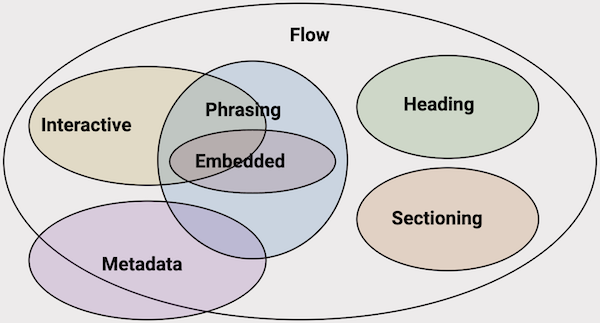
Image description
HTML content categories include:
- Flow content, the base content type
- Metadata content, slightly overlapping Flow
- Sectioning content, within Flow
- Heading content, within Flow
- Phrasing content, within Flow, overlapping Interactive and Embedded
- Interactive content, within Flow, overlapping Phrasing and Embedded
- Embedded content, within Flow, overlapping Phrasing and Interactive
Expected result: the disclosure should still be discoverable and usable, since it is real, visible content in normal reading order, but there is no programmatic link telling a screen reader user that this specific disclosure is the image's extended description.
HTML markup
<figure>
  <img src="image-complex.png"
    alt="Venn diagram depicting content category
    relationships. Detailed description below"
  >
  <figcaption>
    <details id="complex-image-details-1">
      <summary>Image description</summary>
      ...
    </details>
  </figcaption>
</figure>
Example 2: with aria-details
This is the same pattern, but the image now uses aria-details to explicitly point to the disclosure containing its extended description.
Image description
HTML content categories include:
- Flow content, the base content type
- Metadata content, slightly overlapping Flow
- Sectioning content, within Flow
- Heading content, within Flow
- Phrasing content, within Flow, overlapping Interactive and Embedded
- Interactive content, within Flow, overlapping Phrasing and Embedded
- Embedded content, within Flow, overlapping Phrasing and Interactive
Expected result: worth confirming directly, per spec this should let a screen reader user discover that a detailed description exists for this specific image, and support jumping to or conveying that content, but real support for each part of this behaviour varies significantly, see the note below.
HTML markup
<figure>
  <img src="image-complex.png"
    alt="Venn diagram depicting content category
    relationships. Detailed description below"
    aria-details="complex-image-details-2"
  >
  <figcaption>
    <details id="complex-image-details-2">
      <summary>Image description</summary>
      ...
    </details>
  </figcaption>
</figure>
Example 3: multiple values
Per the WAI-ARIA 1.3 specification, aria-details supports referring to more than one element, useful when several independent pieces of extended information relate to the same content, rather than a single description. The example below is a paragraph with two unrelated comments attached.
The spec also defines what should happen when a screen reader's underlying accessibility API can't expose more than one relation at once: it SHOULD fall back to exposing only the first referenced element, not merge the two, not drop the attribute entirely, specifically the first one listed.
All customer records will be retained for seven years.
Legal has confirmed that seven years is required.
Expected result: worth confirming directly, and worth treating with more caution than Example 2, single-value aria-details support is already documented as inconsistent above, multiple values is a newer, even less-tested capability layered on top of that. Per spec, both comments should be discoverable, or, on an AT that can't support multiple relations, only the first ("Should this retention period be reviewed?") should be exposed as the documented fallback. Confirm which of these, if either, actually happens with your standard testing set.
HTML markup
<p
  id="retention-statement"
  aria-details="comment-1 comment-2"
>
  All customer records will be retained for seven years.
</p>

<div id="comment-1">
  <p>Should this retention period be reviewed?</p>
</div>

<div id="comment-2">
  <p>Legal has confirmed that seven years is required.</p>
</div>
Example 4: empty attribute value
aria-details="" is present but has no value at all, no ID reference of any kind.
Expected result: the bookmarklet should label this "aria-details: (empty)" and treat it as broken, not merely a missing ID.
HTML markup
<img src="image-complex.png" alt="..." aria-details="">Example 5: self-reference
This <details> element's aria-details points at its own id. The ID resolves, so this isn't a broken reference, just a circular one, a plausible mix-up between which element should carry the attribute and which should be its target.
Show more
Extra information here.
Expected result: the ID resolves, to itself, so this should be treated as a valid, resolved reference, not an error, labelled "(self)" rather than flagged as missing.
HTML markup
<details id="self-description" aria-details="self-description">
  <summary>Show more</summary>
  <p>Extra information here.</p>
</details>
Example 6: multiple values, one missing
Similar to Example 3, but only one of the two referenced IDs actually exists. Distinct from a fully broken reference where every ID is missing, this is a partial failure, one usable relationship alongside one that resolves to nothing.
Prices shown exclude tax.
Tax is calculated at checkout based on delivery address.
Expected result: per the bookmarklet, when some but not all referenced IDs are missing, the badge should be amber, not red, distinct from a reference that fails completely.
HTML markup
<p
  id="pricing-statement"
  aria-details="pricing-note pricing-note-missing"
>
  Prices shown exclude tax.
</p>

<div id="pricing-note">
  <p>Tax is calculated at checkout based on delivery address.</p>
</div>
Example 7: referenced element uses visibility: hidden
The extended description this image points to is hidden with visibility: hidden rather than a <details> disclosure. The reference itself is still valid, the ID resolves to a real element, but a visibility-hidden element still occupies layout space, unlike display: none, so it's worth testing separately.
Expected result: the relationship itself should be treated as valid, the ID resolves to a real element, but the referenced element shouldn't get its own outline or badge, since it isn't visibly rendered.
HTML markup
<img src="image-complex.png" alt="..." aria-details="hidden-description">
<p style="visibility: hidden;" id="hidden-description">
  Extended description text that is never visually shown.
</p>
Note for testing
Published support data for aria-details is mixed and conflicting, and worth re-testing directly rather than relying on either source below:
- a11ysupport.io (tests dated 2022, applied to an
<img>) splits support into three separate behaviours, each with different results:- Presence of the relationship being conveyed at all: supported in JAWS and NVDA, not supported in VoiceOver or TalkBack.
- Jumping to or conveying the referenced content: supported in NVDA only, not JAWS.
- Conveying the start/end boundaries of the details: supported in JAWS only, not NVDA.
- A DAISY Consortium report from 2023 found
aria-detailspointing specifically at a<details>element, the same pattern used above, worked effectively across JAWS, NVDA, VoiceOver, and TalkBack, with NVDA needing an add-on for full functionality. This directly contradicts a11ysupport.io's results for VoiceOver and TalkBack.
Given the age and conflict between these sources, and that support for this attribute has historically been patchy, this is worth testing fresh against current browser and screen reader versions before drawing conclusions.
Multiple-value support (Example 3) is newer than what either source above tested, and hasn't been independently verified anywhere referenced on this page. Treat it as an open question rather than an extension of the single-value findings above.
Should this retention period be reviewed?